
Nedbank Direct EFT
Nedbank customers authorise the payment directly with Nedbank using their SA ID number.
On this page8 sections
Nedbank Direct EFTNedbank Direct EFT Nedbank's own payment method. Like the other bank APIs it gets its own button at checkout rather than sitting inside the bank list, and it requires Customer Identity Verification.Nedbank lets customers who bank with Nedbank authorise a payment directly with Nedbank, using their SA ID number to identify themselves. It uses a direct connection between Nedbank and Ozow, so customers don't enter internet banking details on the payment page. It's a fast, secure payment option for Nedbank customers at checkout.
Nedbank Direct EFT is one of the bank app methods under Pay by BankPay by Bank The payer authorises the payment inside their own banking app or online banking, and the funds move from their bank account. No card is involved and no card details are entered..
At a glance
| Nedbank Direct EFT feature | What you need to know |
|---|---|
| Enabled by default | No. Contact Ozow support or your account manager to enable it |
| Customer needs | A Nedbank account and a South African ID number |
| Customer enters | SA ID number |
| How the customer approves | On a secure Nedbank screen, by selecting an account and tapping Authorise |
| Reversibility | Irrevocable once confirmed. No chargebacks |
| Refunds | Yes, initiated by you. See Refunds |
| Transaction limits | Your customer's own Nedbank payment limits apply. |
| SettlementSettlement Ozow paying the money you have collected into your bank account. Payins arrive at Ozow first and are settled to you on a schedule, so what a customer paid you today and what has been settled to you today are different amounts. | Once a day: 15:00 on weekdays and 08:00 on Saturdays. No settlement on Sundays or public holidays |
| Identity verificationCustomer Identity Verification Checking that the payment instrument belongs to the natural person making the payment. Ozow requires it for merchants it has classified as high-risk, on Pay by Bank, Absa Pay, Capitec Pay, Nedbank Direct EFT, FNB Payment Requests and PayShap Request, and can disable those methods where it is not implemented correctly. | Mandatory for high-risk industries. See Identity Verification |
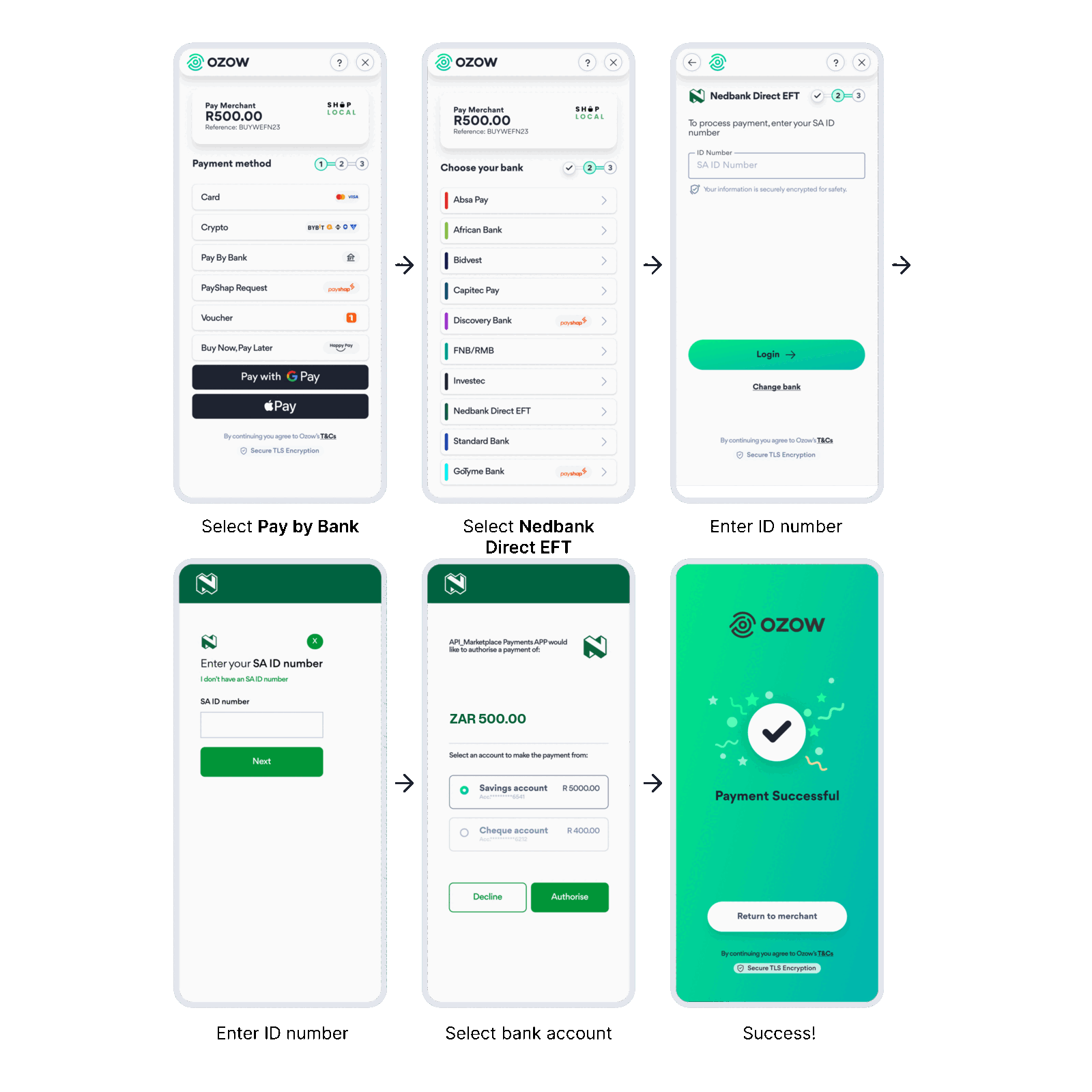
How your customer pays
- Your customer selects Pay by Bank at checkout, then Nedbank Direct EFT.
- They enter their SA ID number and tap Login.
- On the Nedbank screen, they confirm their SA ID number and tap Next.
- They select the Nedbank account they want to pay from and tap Authorise, or Decline.
- Ozow shows a success screen, and your customer taps Return to merchant to go back to your site.
Enabling Nedbank Direct EFT
Nedbank Direct EFT is opt in. If it isn't showing on your payment page, contact Ozow support or your account manager to enable it. No additional integration is required: once it's enabled, it appears on the Ozow payment page.
Integrating Nedbank Direct EFT
Nedbank Direct EFT works with every integration that supports Pay by Bank. See Integrating Pay by Bank.
Standalone bank buttons. To show your own Nedbank Direct EFT button and send customers straight
to it, skipping the bank list, pass its institutionId. See Payment Method
IDs and Standalone payment
buttons.
Nedbank icons are in Brand assets.
Confirming payment. Only fulfil an order once you've received a confirmed successful status from Ozow. See Statuses.
Testing
We recommend testing with small live payments in production. Production payments settle back to you as normal, so it's safe to test this way. If you need staging credentials, contact Ozow support or your account manager.
Refunds, settlement and reconciliation
- Refunds: you can refund a Nedbank Direct EFT payment. That's your decision, not something the customer can force through their bank. See Refunds.
- Settlement: Nedbank Direct EFT payments are settled once a day: 15:00 on weekdays and 08:00 on Saturdays. No settlement occurs on Sundays or public holidays. See Settlements.
- Ozow Portal: transactions and statuses update in real time on the Ozow Portal.
Things to know
Your customer needs an SA ID number. Nedbank Direct EFT uses the customer's South African ID number to identify them. The Nedbank screen includes an "I don't have an SA ID number" option.
Your customer chooses the account when they authorise. They select which Nedbank account to pay from on the Nedbank screen, before tapping Authorise.
Nedbank Direct EFT payments are irrevocable. Once confirmed, the funds are yours. There's no chargebackChargeback A completed card payment reversed by the customer's bank after a successful dispute. The funds come back out, and the process runs between the banks rather than through Ozow, so it is not something you can approve or refuse. Your transaction records and delivery confirmations are what it is decided on. process.
FAQs
What is Nedbank Direct EFT? A secure way for Nedbank customers to pay online. It uses a direct connection between Nedbank and Ozow, so customers don't need to share their internet banking details with third-party websites.
What's the difference between Nedbank and Nedbank Direct EFT? With standard Pay by Bank, customers sign in with their internet banking details. Nedbank Direct EFT is an API-based approach from Nedbank: customers enter their SA ID number and authorise the payment directly with Nedbank.
How does my customer use Nedbank Direct EFT? They choose Nedbank Direct EFT at checkout and enter their SA ID number. Nedbank then asks them to confirm their ID number, choose an account and authorise the payment.
How do I enable Nedbank Direct EFT? Contact Ozow support or your account manager. No additional integration is required.
When are Nedbank Direct EFT payments settled? Once a day: 15:00 on weekdays and 08:00 on Saturdays. No settlement occurs on Sundays or public holidays.
How long do transactions take to show on the Ozow Portal? Transactions and statuses update in real time, the same as standard Pay by Bank.
Is there a limit on how much a customer can pay? Your customer's own Nedbank payment limits apply.
Last updated