
Crypto Payments
Your customer pays from a supported crypto wallet, while you're paid in rand.
On this page9 sections
Crypto lets your customers pay using their preferred crypto wallet, while you receive settlementSettlement Ozow paying the money you have collected into your bank account. Payins arrive at Ozow first and are settled to you on a schedule, so what a customer paid you today and what has been settled to you today are different amounts. in
randZAR The ISO 4217 code for the South African rand, and the currency every amount on this site is in unless a page says otherwise. Amounts are decimal rand rather than cents, so 100.00 is one hundred rand.. You can offer it as an alternative payment option at checkout without any exposure to
cryptocurrency price volatility.
You never hold or handle cryptocurrency. The payment is converted to rand at the point of payment, so what reaches your account is an ordinary rand amount. You don't need a crypto wallet, an exchange account or anywhere to store digital assets.
Ozow's crypto payments are powered by MoneyBadger, Ozow's crypto payments partner.
At a glance
| Crypto feature | What you need to know |
|---|---|
| Enabled by default | No. Contact Ozow support or your account manager to enable it |
| Provider | MoneyBadger, Ozow's crypto payments partner |
| Customer needs | A supported crypto wallet with enough funds |
| Supported wallets | Luno, Binance, VALR, Bitcoin Lightning wallets and Bybit |
| How the customer approves | In their own crypto wallet app |
| What you receive | Rand (ZAR). No exposure to crypto price volatility |
| Refunds | Yes, through the standard Ozow refund process. See Refunds |
| Transaction limits | None from Ozow. MoneyBadger may apply its own limits |
| Settlement | Typically the next day, like Pay by BankPay by Bank The payer authorises the payment inside their own banking app or online banking, and the funds move from their bank account. No card is involved and no card details are entered., but it can take up to 3 days |
How your customer pays
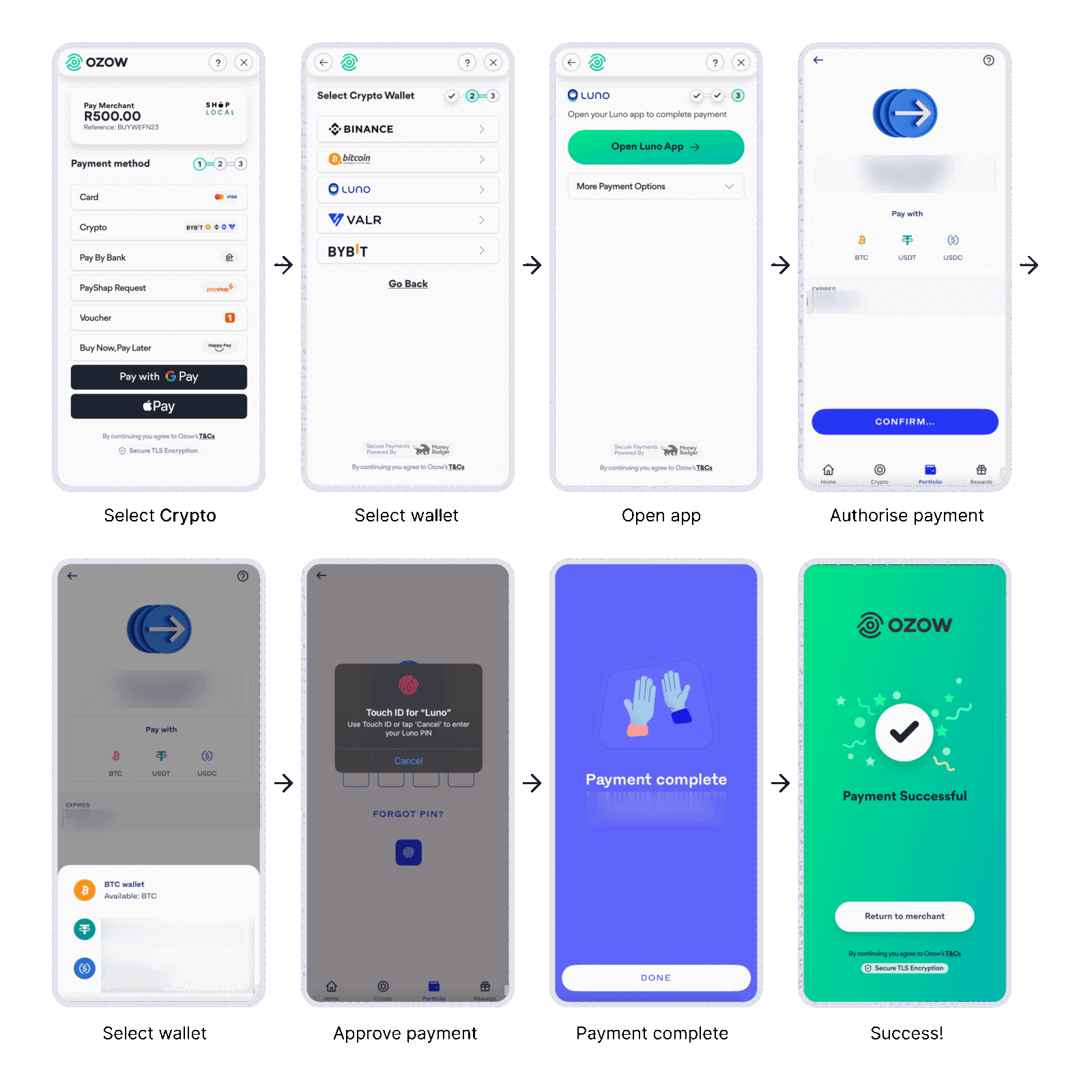
- Your customer selects Crypto at checkout.
- They select their crypto wallet, for example Luno.
- They tap to open their wallet app. Other options are under More Payment Options.
- In their wallet app, they choose which cryptocurrency to pay with, for example BTC, USDT or USDC, and tap Confirm.
- They approve the payment with their biometrics or wallet PIN.
- The wallet confirms the payment, and Ozow shows a success screen.
- Your customer taps Return to merchant to go back to your site.
When to use Crypto
Crypto suits you if:
- Some of your customers already hold crypto and want to spend it.
- You want an extra payment option without taking on crypto price risk.
Offer it alongside your other payment methods. It's an additional option for customers who already hold crypto in a supported wallet, not a replacement for card or Pay by Bank.
Enabling Crypto
Crypto is opt in. Contact Ozow support or your account manager to enable it. Once it's enabled, Crypto appears on the Ozow payment page automatically. There's no separate integration and nothing to build.
Integrating Crypto
Crypto works with every Ozow integration method, and nothing crypto-specific is required.
- Hosted Checkout: send your customer to the Ozow payment page using an API-based integration.
- Embedded Checkout: show the Ozow payment page inside your site, as an iframe or a modal.
- No code payment requests
- Plugins and platforms
Standalone bank buttons. To send customers straight to Crypto and skip the payment method selection
screen, pass Crypto's institutionId. See Payment Method IDs
and Standalone payment buttons.
Crypto icons for your checkout buttons are in Brand assets.
Confirming payment. Only Ozow's confirmation counts, not a wallet screen or a transaction ID. Only fulfil an order once you've received a confirmed successful status from Ozow. See Statuses.
Testing
We recommend testing with small live payments in production. Production payments settle back to you as normal, so it's safe to test this way. If you need staging credentials, contact Ozow support or your account manager.
Refunds, settlement and reconciliation
- Refunds: Crypto payments can be refunded through the standard Ozow refund process. See Refunds.
- Settlement: you're settled in rand, typically the next day like Pay by Bank, but it can take up to 3 days. See Settlements.
Things to know
You're paid in rand, always. The conversion happens at the point of payment, so changes in the price of the cryptocurrency between then and your settlement don't affect you.
Only the customer can authorise the payment. Approval happens inside the customer's own wallet. If they don't approve, reject the payment or don't have enough funds, the transaction won't complete.
Only Ozow's confirmation counts. A wallet screen or transaction ID isn't proof of payment. Wait for Ozow's confirmed successful status before you fulfil an order.
Your customer needs a supported wallet. Someone holding crypto in an unsupported wallet can't pay you this way. Supported wallets may change over time.
It works best on a phone. Your customer approves the payment in their wallet app, so the flow is smoothest when they're paying on the same phone their wallet is on.
FAQs
What are crypto payments? A checkout payment method that lets customers pay from a supported crypto wallet: Luno, Binance, VALR, Bitcoin Lightning or Bybit.
Is it risky to offer crypto at checkout? No. You're settled in rand and aren't exposed to crypto price volatility.
How does the payment flow work? The customer picks their wallet and approves the payment inside it. Ozow then sends the outcome to your business.
Does the customer need a crypto wallet? Yes. They need a supported wallet with enough funds.
What if the customer doesn't approve, rejects the payment or doesn't have enough funds? The transaction won't complete. Only the customer can authorise the payment, in their wallet. Don't fulfil an order without a confirmed successful status from Ozow.
How will I know a payment succeeded? Through Ozow's status update in your integration. Only Ozow's confirmation counts, not a wallet screen or transaction ID.
Are refunds supported? Yes, through the standard Ozow refund process.
Does settlement change, and are there fees? You're settled in rand, typically the next day, though it can take up to 3 days. Fees may apply depending on the wallet, cryptocurrency, network and provider.
Are there transaction limits? Ozow sets no limits for crypto payments. MoneyBadger may apply its own.
How do I enable Crypto? Contact Ozow support or your account manager.
Is it secure? Yes. Authentication happens directly in the customer's own crypto wallet.
Last updated