
Buy Now, Pay Later
Your customer splits their purchase into instalments with Happy Pay, while you're paid the full amount.
On this page9 sections
Buy Now, Pay Later (BNPL) lets your customers buy now and pay inPayin A payment made by a consumer to a merchant. The direction most of this site is about: money coming in. Its counterpart is a payout, which sends money out and is not tied to any payment anyone made you. instalments over time. With Happy Pay and Ozow, customers split their payment with no deposit and zero interest, provided their payments are made on time. You can offer it as a flexible payment option at checkout.
You receive the full transaction value. You're not waiting on your customer's instalments, and you're not chasing them for payment: Happy Pay manages the repayment plan and collects the instalments.
At a glance
| Buy Now, Pay Later feature | What you need to know |
|---|---|
| Enabled by default | No. Contact Ozow support or your account manager to enable it |
| Provider | Happy Pay, Ozow's BNPL partner and the credit provider |
| Customer needs | A Happy Pay account (they can register at checkout), a mobile number, and a debit or credit card for repayments |
| How the customer pays | Two instalments, with no deposit and zero interest if payments are made on time |
| Approval | Happy Pay assesses the customer at checkout. Not every customer is approved |
| What you receive | The full transaction value |
| Collection risk | None for you. Happy Pay collects the instalments |
| Refunds | Yes, initiated by you through Ozow. See Refunds |
| Transaction limits | None from Ozow. Happy Pay may apply its own limits, for example based on the customer's spend limit assessment |
| SettlementSettlement Ozow paying the money you have collected into your bank account. Payins arrive at Ozow first and are settled to you on a schedule, so what a customer paid you today and what has been settled to you today are different amounts. | The full transaction amount, weekly |
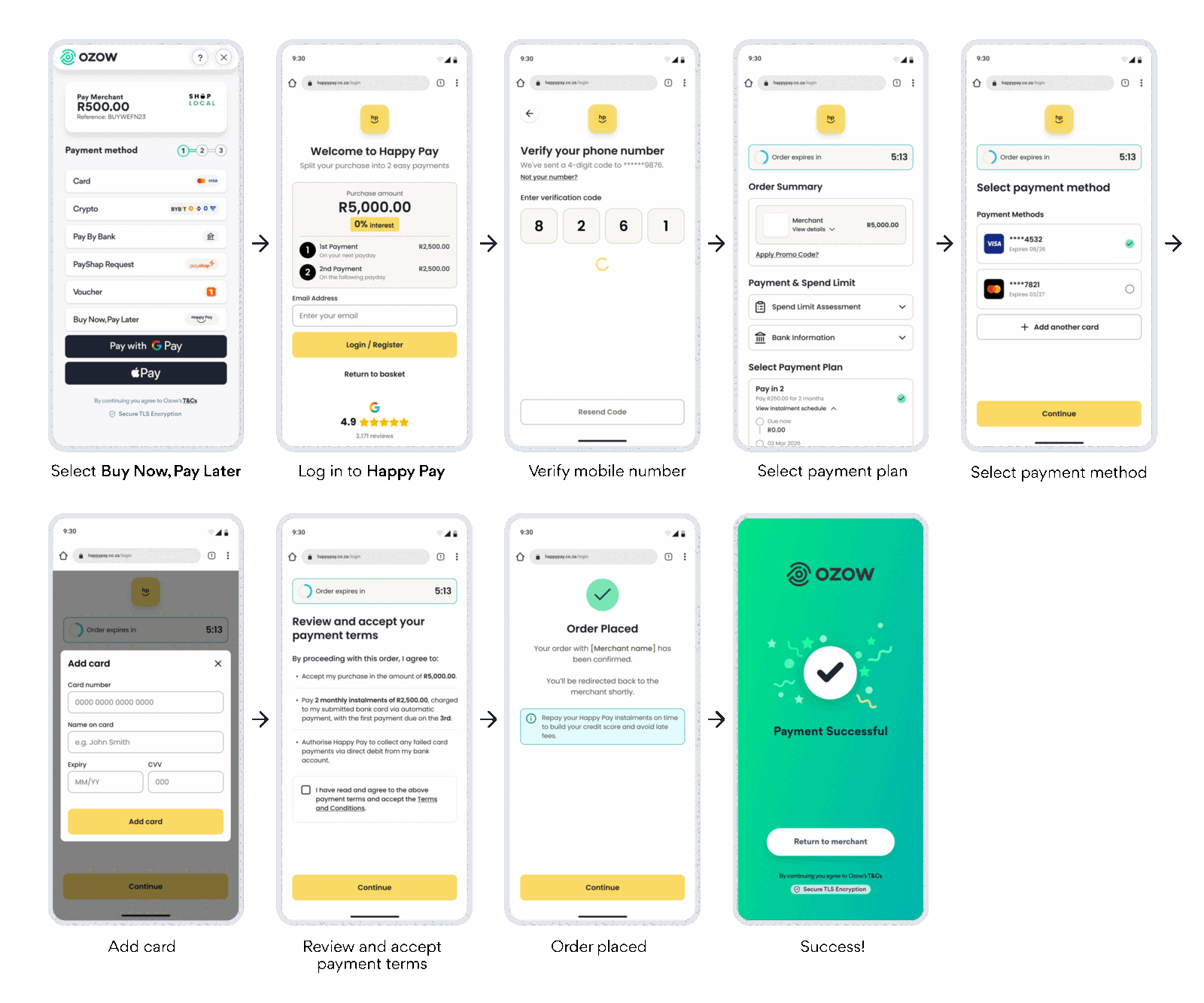
How your customer pays
- Your customer selects Buy Now, Pay Later on the Ozow payment page and is redirected to Happy Pay.
- They log in to Happy Pay, or register with their email address.
- They verify their mobile number with a one-time code.
- Happy Pay assesses their spend limit, and they choose their payment plan. Happy Pay shows them the instalment schedule.
- They choose a saved card, or add one, for their instalments.
- They review and accept the payment terms, and Happy Pay confirms the order.
- Ozow shows a success screen, and your customer taps Return to merchant to go back to your site.
- Happy Pay collects the instalments from your customer directly.
If the payment is declined or cancelled, your customer can choose another payment method.
When to use Buy Now, Pay Later
BNPL suits you if:
- Customers hesitate over baskets they can't afford in one go.
- You want to meet changing customer expectations with more payment flexibility at checkout.
- You want to grow your business through higher conversion rates and increased customer acquisition.
Always offer it alongside other payment methods. Happy Pay decides who's approved, so customers who are declined need another way to pay.
Enabling Buy Now, Pay Later
BNPL is opt in. Contact Ozow support or your account manager to enable it. Once it's enabled, it appears on the Ozow payment page automatically. No additional integration is required.
We highly recommend the Happy Pay widget. Happy Pay offers a product-page widget and a pull-out button so customers can see the instalment option before they reach checkout. BNPL works best when customers know it's available while they're still deciding. Ask your account manager about adding them.
Integrating Buy Now, Pay Later
BNPL works with every Ozow integration method, and nothing BNPL-specific is required.
- Hosted Checkout: send your customer to the Ozow payment page using an API-based integration.
- Embedded Checkout: show the Ozow payment page inside your site, as an iframe or a modal.
- No code payment requests
- Plugins and platforms
WooCommerce and Magento have dedicated Happy Pay plugins if you'd rather show BNPL as its own option in your store's checkout.
Standalone bank buttons. To send customers straight to BNPL and skip the payment method selection
screen, pass BNPL's institutionId. See Payment Method IDs
and Standalone payment buttons.
BNPL icons for your checkout buttons are in Brand assets.
Confirming payment. Only fulfil an order once you've received a confirmed successful status from Ozow. See Statuses.
Testing
We recommend testing with small live payments in production. Production payments settle back to you as normal, so it's safe to test this way. If you need staging credentials, contact Ozow support or your account manager.
Refunds, settlement and reconciliation
-
Refunds: your customer asks you for the refund. Once you've approved it:
- You log the refund with Ozow.
- The refunded amount is deducted from your floatFloat The balance held with Ozow that payouts and refunds are paid out of. Both draw on it, and neither will process while it is empty. Payins do not need one, so if you only take payments you never meet it.. For example, R500 on a R1,000 transaction.
- Ozow notifies Happy Pay, which adjusts the customer's BNPL balance.
- The refunded amount is reconciled in the next settlement between Happy Pay and Ozow.
See Refunds.
-
Returns and delivery disputes. Any delivery or product disputes are yours to resolve with the customer before a refund is processed.
-
Settlement: you receive the full transaction amount, settled weekly. See Settlements.
Things to know
You're paid the full transaction value. Not the first instalment, not a portion: the full amount, settled weekly.
You don't carry the collection risk. Happy Pay approves the customer, manages the repayment plan and collects the instalments. If a customer stops paying, that's between them and Happy Pay. It doesn't come back to you.
Not every customer will be approved. Happy Pay decides at checkout, not you. Always keep other payment methods available so a declined customer can still complete the purchase.
Instalment queries go to Happy Pay. Once a customer is on a plan, their repayments, dates and any arrangements are between them and Happy Pay. Brief your support team before you switch BNPL on, because customers will often contact you first.
Happy Pay is the credit provider, not you. You're accepting a payment like any other. You're not lending to your customer.
FAQs
What is Buy Now, Pay Later and Happy Pay? BNPL lets customers buy now and pay in instalments over time. With Happy Pay and Ozow, customers can split their payment with no deposit and zero interest, provided payments are made on time.
How does BNPL benefit my business? It gives you a trusted way to meet changing customer expectations, while helping you grow through higher conversion rates, increased customer acquisition and greater payment flexibility at checkout.
Do I need to integrate or build anything? No additional integration is required, but we highly recommend the Happy Pay widget.
How do I enable BNPL? Contact Ozow support or your account manager.
How does the collection of funds work? Happy Pay manages collections. You don't take any risk on collecting the instalments.
What are the fees? Fees may apply. Speak to your account manager.
When are transactions settled? The full transaction amount is settled weekly.
Are there transaction limits? Ozow sets no limits for BNPL. Happy Pay may apply its own, for example based on the customer's spend limit assessment.
How does the payment flow work for my customers? They select Buy Now, Pay Later on the Ozow payment page and are redirected to Happy Pay to complete the process. Once approved, the transaction is completed and they return to your site. If the payment is declined or cancelled, they can choose another payment method.
How do returns, refunds and delivery disputes work? The customer asks you for a refund. Once you approve it, you log it with Ozow, the amount is deducted from your float, and Happy Pay adjusts the customer's balance. Delivery and product disputes are yours to resolve with the customer before a refund is processed.
Who can I contact for support? Your account manager, or Ozow support.
Last updated